Output & Grouping
Control how rendered card images are named, duplicated, merged from multiple rows, and grouped into separate folders and PDFs.
Output & Grouping
These four Root-level properties control what happens to each card image after it is rendered: how the file is named, how many copies are produced, whether multiple spreadsheet rows are merged into one card, and whether cards are split into separate output folders (and therefore separate PDFs).
All four properties are set in the template settings panel, which you open by clicking the button in the template toolbar.
Output — file name
The Output property controls the file name given to each rendered card image.
- Default: when left blank, images are named
image1.png,image2.png, and so on, based on their row position in the sheet. - Dynamic name: use column references to make each image uniquely named from the row's data, e.g.
{{Type}}-{{Name}}. A row whereNameis "Dragon" andTypeis "Monster" producesMonster-Dragon.png.
A unique, descriptive Output name is required. It determines which existing file gets replaced on re-render — if two rows produce the same name, the second overwrites the first.

Copies — print quantity
The Copies field tells the PDF layout how many times each specific card should appear in the printed output.
Set it to a number greater than 1 and each card image is automatically placed that many times when the PDF is generated. The file name gains a -x{n} suffix so the PDF engine knows the count — for example a card named Monster-Dragon.png with Copies set to 3 is saved as Monster-Dragon-x3.png.
You can reference a spreadsheet column to vary the count per card:
- For example set Copies to
{{Copies}}and a row withCopies = 4produces a file namedMonster-Dragon-x4.png, which is placed four times in the PDF.

MergeRows — multiple rows per card
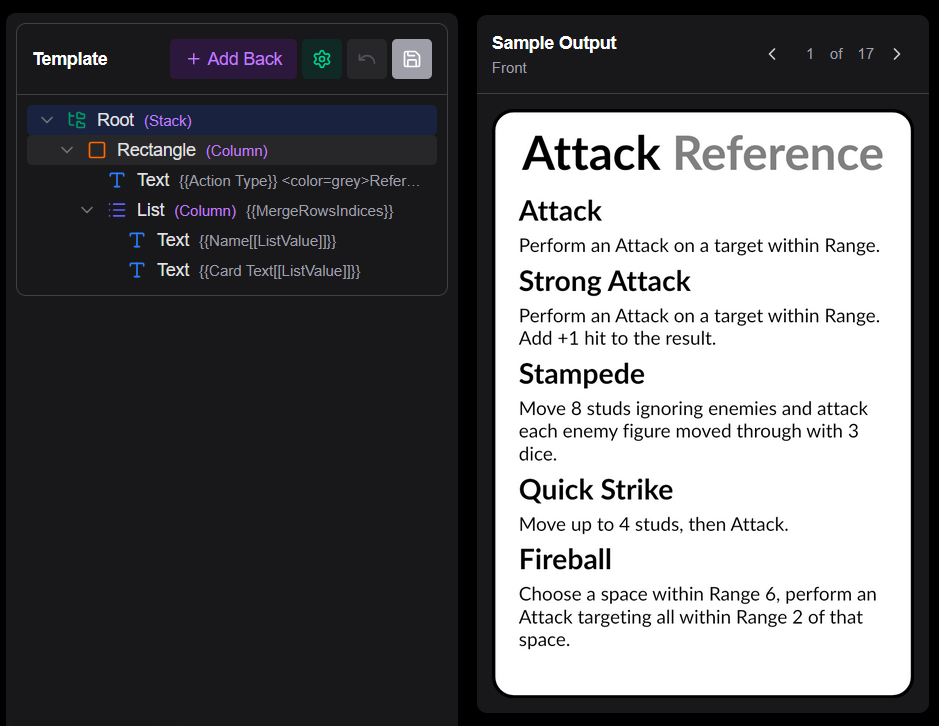
MergeRows lets you combine data from several spreadsheet rows into a single rendered card. This is useful when a card represents a collection of items — for example a card that lists several abilities or multi-use cards, each stored as its own row in the sheet.
Setting it up
- In the template settings panel, find or add the MergeRows property and enter the name of the column whose value determines which rows belong together (e.g.
CardName). - Optionally set MergeRowsMax to cap how many rows can be merged into a single card. If a group exceeds this limit it is split into multiple cards.

Accessing merged data in elements
When rows are merged, the data from each source row becomes available with a numeric suffix. For a merge of three rows, the columns of the first row are {{Name1}}, {{Color1}}, etc.; the second row's columns become {{Name2}}, {{Color2}}; and so on. This allows you to reference them dynamically in a List or TextList element.
Two extra auto-generated data values then become available:
| Column | Value |
|---|---|
{{MergeRowsSize}} | How many rows were merged into this card |
{{MergeRowsIndices}} | Comma-separated position numbers of the merged rows (e.g. 1,2,3) |
Group — separate images into folders
The Group property places each card's image into a named subfolder rather than the root asset folder. Any dynamic value — typically a spreadsheet column reference — can be used as the group name.
Example
Set Group to {{Faction}}. Cards whose Faction column is Raven are saved into a Raven/ subfolder; cards where Faction is Eagle go into Eagle/.
Effect on PDF generation
When PDF generation is enabled, each group subfolder is treated as an independent set of cards and produces its own PDF. The PDFs are named {assetName}-{groupName}.pdf — for example monsters-Raven.pdf and monsters-Eagle.pdf.
This means you can maintain one template and one spreadsheet but produce a separate, ready-to-print PDF per faction, expansion, player colour, or any other category your sheet tracks.
Related
Components
How to create, use, and manage reusable template components in Board Game Builder — including template components, imported components, and using component within text.
Markdown in Text Elements
Full reference for all Markdown and rich-text syntax supported in Board Game Builder text values.