Getting Started
Sheet Source Data
How to connect Google Sheets or CSV files as your data source in Board Game Builder.
Sheet Source Data
Board Game Builder uses a spreadsheet as the data source for your card templates. Each row in the sheet becomes one card (or data record), and column headers in the first row become available as data bindings in your template.
Supported data sources
- Google Sheets — a specific sheet inside a Google Spreadsheet.
- CSV files — a CSV file hosted in Google Drive.
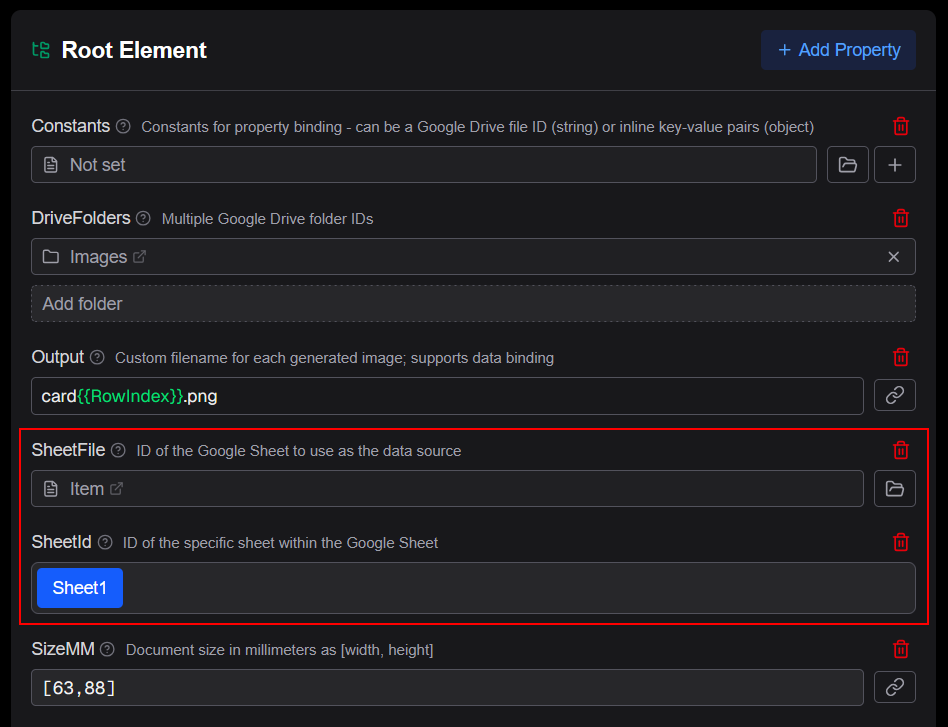
Connecting a Google Sheet
- Open your project and navigate to the Settings (gear icon)
- Set the
SheetFileproperty to your Google Sheet ID or Drive file - Set the
SheetIdto the specific sheet tab (0 = first tab) - The column headers from row 1 are automatically available as data bindings
Connecting a CSV file
- Open your project and navigate to the Settings (gear icon)
- For
CsvFile, select the CSV file in Google Drive. - Optionally set the
CsvSeparatorif your file uses another separator than comma (,) - The column headers from line 1 are automatically available as data bindings
Data binding syntax
With a data source connected you can now reference column data in the card template using the {{ColumnName}} syntax:
Source: "{{CardName}}"Column names are case-sensitive and must match the header row exactly.